Fill out your e-mail address and click submit to join the positech games newsletter!

Update on current position of GSB

Filed under: game design,gratuitous space battles cliffski 12:38 pm July 30, 2009

I’m trying to get towards a pre-order/beta situation, but I don’t want to rush anything. The game looks quite nice (I intend for it to look nicer,e specially the UI), and technically plays ok, but there are quite a few bugs and minor glitches right now. Here is what is currently on my immediate list to address:

  • Fighters sometimes retreat to their deployment zone (I thought I’d removed that code) and then just sit there. I’m considering letting fighters auto repair over time when not under fire.
  • Enemy ships actually occasionally path find off of the map. The game still works fine, but not seeing the enemy kind of sucks. The background is one big image, not a tile, so infinite scrolling can’t easily happen…
  • It’s possible that none of your weapons can penetrate your enemy flagships shields, or more likely, you don’t have enough fire-power per minute to actually knock the shields out entirely. I’m considering a number of fixes for this, because it can lead to infinite stalemates. One possibility is letting every weapon do some minor ‘leakage’ damage through shields. maybe just 2-3% of normal damage.
  • The code to unlock levels as you go along is broken
  • Some of the smoke particle effects look really bad. Something has gone wrong a bit there
  • I’m considering how to code an ‘alpha-strike’ order for ships, that basically says ‘try to co-ordinate your fire with a number of other weapons from you or other ships to blap in one go’. This is no mean task, and opens up the can of worms that orders are per-ship, not per-weapon. Hmmm.

So I’m pretty busy :D And this is all ignoring the graphical fluff I desperately want to find time to add to the game, plus other gameplay modes blah blah.

Much better deployment UI done

Filed under: game design,gratuitous space battles cliffski 3:27 pm July 26, 2009

I’ve made good progress today and yesterday, despite distractions by Anno 1404, and being a bit ill. Here is a screen showing the new deployment layout. The UI needs polish, but this is how it looks.

I’ve got proper selection and multiple ship AI-editing working now. This means you can drag select, or double click select (no shift-add select yet) a group of ships, and then add a new behaviour to them all (if the behavior exist, it doesn’t matter) remove a behaviour, or edit the parameters of existing ones. This means that rubbish copy+paste stuff is gone, and you can edit groups of ships as you would expect to, including selecting a whole bunch and moving them as a group. The icon with a + on it creates a new ship design in the editor. I’m aware that it looks like a health icon, and I intend to redo it… I’ll also move the ‘main menu’ button to bottom left where it clearly belongs.

Also, I’m reliably told that AI ‘behaviours’ sounds weird, and programmy. Does ‘Orders’ sound better? I suspect it does. It’s only a GUI change.

Start of UI re-design for Gratuitous Space Battles

Filed under: game design,gratuitous space battles cliffski 9:08 pm July 24, 2009

Here is a small screen of the new Deployment stuff for gratuitous space battles so people can tell me how I’m doing it all wrong :D

The fleet design screen and pre-deployment configuration screen are all gone. Now there is basically just this. The player chooses a battle to fight, and that brings them here. The difficulty setting selector will sit at the bottom once added. The strips at the top show the current fleet cost and pilot count as a fraction of the limit for this battle. A basic fleet is already shown (only for mission #1, other missions will start with an empty fleet). On the right hand side is a picker showing your current ship designs, and eventually some new icons over here will allow you to create totally new designs (launches a separate window).

How do you add new ships to the fleet or remove old ones?

Answer that in your head first, then feel free to tell me what you thought up.
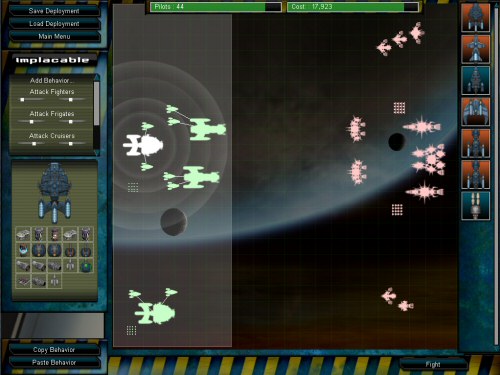
My current solution is that you basically try and drag one of those far-right icons onto the map. It turns immediately into a ship silhouette of that type, and you can place it anywhere in the deployment zone (highlighted). if you drop it anywhere else, it’s deleted. To remove an existing ship, you just drag it out of the zone.

I will also include hotkeys and maybe a right click context menu to edit a design, delete a ship, rename a ship etc. This will all be in the manual, tooltips and tutorial windows, but I hope it will also be intuitive.

Thoughts? Gaps in the UI, font choices etc, are all place-holder and will be finalised later. At the moment, It’s a case of getting the general flow of things right at last. Work-in-progress UI’s rarely look awesome!

My idea is that this represents the ‘design’ of this battle. You can drag ship designs to and from the battle here, launch the ship editor from here, and generally this represents the central hub from which you play with this map.

In total, the game is going to be 4 areas:

  • Main Menu (goes to options screen, online stuff etc)
  • Select Battle screen, with a simple list of missions
  • This deployment screen, and its associated full-screen ship editor
  • The battle screen, where you view the real-time battles.

UI rethink

Filed under: game design,gratuitous space battles cliffski 9:34 pm July 23, 2009

My UI sucks. Some people who tried the game have made me realise this. The battles are cool, the idea is ok, but the flow of the UI is too complex and fiddly and crap.
The actual ‘look’ of the UI isn’t so bad, but its just a really bad ‘flow’ from ship design to fleet design to fleet deployment to combat.
it need a bit of a re-arrangement and re-think, which will be messy and annoying and not as much fun as programming new explosion effects…

Right now you need to think like a programmer to play the game. I want it to be more like someone who wants to arrange a fun space battle would think. The current system is sort of boxy and procedural like this:

  • Create ships and save them as files.
  • Create fleets for a specific battle from saved ships, and save them as files
  • Create deployments of those fleets for that battle, and save them as files
  • Select one of those files to fight against an enemy fleet.

This sucks. What I think I need is more like this:

  • Select Battle to fight (together with difficulty level)
  • View an existing (crappy basic sample) fleet already deployed for it
  • Have the option to re-arrange the ships, add new ones from a picker, or add new designs to the picker all on that screen (new designs will effectively open a new interface to do that)
  • Hit the fight button

With that system, there will be options to save out ship designs that you use in the battle, and to save out the deployment (or maybe I always save the deployment for each battle so I have a ‘last-used’ deployment).
The key thing would be that its all based around a single process, and a single screen. The fleet design interface will effectively be dead

Alpha, Warping in and firing arcs

Filed under: game design,gratuitous space battles cliffski 4:51 pm July 22, 2009

Ok lots to say.

Firstly, I’m declaring GSB is at a very early alpha, and I’m currently putting together a build for some people I know to take a look at. This isn’t an open beta or pre-order yet, that;’s a while off. The music isn’t even done yet, so be patient :D . This is quite a milestone tor each though.

Secondly, I decided against firing arcs. I thought about it all morning, typed up all the pros and cons. I can see the pros, but he cons are a combination of aesthetics, AI issues, and complexity. GSB is not meant to be as hardcore as Starfleet command, so I’m wary of overcomplicating it. Also, firing arcs would mean an order of magnitude more decisions for the Ai commanders of each ship. Also, it would mean that the ships were constantly banking from one angle to another to get shots in. I prefer the look of the Revenge of the Sith or Return of the jedi style battles, with big, almost stationary cruisers blasting away at each other. Feel free to change my mind though.

Thirdly, I added this sort of warp-effect intro thing to each battle. The camera pans across your fleet as they arrive on scene. Video below: (as you can see some battles have BIG fleets. Are you SURE you want more complexity per-ship? L:D)

Deployment Screen Tweaks

Filed under: game design,gratuitous space battles cliffski 2:41 pm July 21, 2009

Ok, so here is the current (and close to final) layout of the fleet deployment screen (click to enlarge). The new thing that has gone in, and was a long time coming (apart from some UI tidyups, and better support for the range of possible screen resolutions), is individually highlighting weapon ranges.

You can see that I’ve moused-over one of the icons for this ships modules (Light Plasma Launcher), and the range of that weapon from the ship is shown as a bright white circle around it. The faded out circles represent the ranges of this ships other weapons, and by mousing over them, I can see which is which. This will make positioning ships better much easier, and will remind you what ships are suited to particular roles.

One thing that isn’t done is offsetting those ranges to take into account the modules placement on the ship. It will not make a big difference, but maybe it’s worth doing. For the big ships on small maps, it’s probably worth putting certain weapons at the front.

The Manual

Filed under: gratuitous space battles cliffski 9:36 pm July 19, 2009

I started work on the manual for GSB today. It’s going to be a pdf that’s installed along with the game, although I am tempted to also make it downloadable before the game is finished, so people can give feedback on the game design.

The good news is that I now have a list of 16 things I need to get done before the game will be alpha, then I need some alpha feedback and I’ll be looking at beta. Some of those 16 things are pretty big, and will take days, some are small, like doing an icon.

One of the bigger ones is the manual. It’s surprising how much information I need to put in it to explain the mechanics of the game, without adding lots of stats stuff such as all of the ship modules and race backstories, which I haven’t done yet. I need to polish up the formatting, and get up to date screen shots for it all too, plus spellcheck, check the grammar blah blah.

Those 16 things do not include graphical fluff and polish which I also intend to get done, but some of that might be done when I’m waiting for alpha or beta feedback.

It’s good to have some sort of plan for getting from here to release anyway.

Faster Debris management. (coding stuff)

Filed under: gratuitous space battles,programming cliffski 3:53 pm July 16, 2009

Today I did some tests on GSB as I expect it to be played eventually by hardcore gamers. That means the biggest mission in the game, hundreds of fighters on each side, huge fleet, huge map, with all graphical options turned on and fullscreen in 1920×1200 (highest res on my monitor). To my delight, it handles it pretty well, dipping below 60FPS only a few times when viewing complete mayhem. (Geforce 8800 GTS on vista, Core 2 Duo)

That’s a release build, but with debug symbols in it, so it might get a tad faster.

In this build, under those circumstances, one of the slowdowns is the debris. Not the rendering of it, but the creation of it. I cap the debris at 4,000 items. 2,000 in each of two ‘pools’. The slowdown was some code that basically did this:

for(each debris item)
{
if(isfree)
{
return debris item
}
}

(It was cleverer than that, in that it only started its search from where it left off last time, to minimize wasted checks, but you get the idea.).

The slowdown was literally the loop hassle of going through maybe 2,000 checks of the ‘free’ flag, with theoretically it being the case that only number 1,999 is free for re-use (or none of them).  Readers with long memories may recall I had implemented a periodic debris-defragger, which makes this stuff easier. However, I can’t be doing that every frame, so I tried out a new system today. (after a few false starts). The new system is fiendishly more complex and works like this:

There are 10 debris ‘free registers’ which are basically indexes into the array of debris. These registers identify debris items that are currently free by their index. Whenever I’m processing some debris, if it becomes free (fades out size or alpha-wise) I notify the pool to stick its index in any empty ‘free register’ that it has. This means finding an empty free register, but there are only 10, so it’s super quick.

Then the new piece of code to get some free debris does this:

for (each free register)
{
    if(register is valid)
    {
        return register[x]
    }
}
for(each debris item)
{
    if(isfree)
    {
        return debris item

}
}

This checks if any of the registers have any free pieces of debris, and if they are free, I re-use them (and note that the register is now blank). If all the registers are blank, I must have allocated more than 10 debris since I last let any fade out, so I need to go through the whole list as usual to try and find some free ones. If that fails, I check for some that are offscreen (I maintain a separate register of those), and if even that fails (we have 2,000 live debris onscreen!), I just randomly kill one and use that.

This chunk of code takes half the time the old one did, despite having more code in general. Does that mean its 50% faster? or 100% faster. I can’t get my head around that. If anyone can spot anything I’m doing thats stupid, I’m not above being humiliated in the comments with a smarter algorithm :D . I picked 10 as my number of registers in an arbitrary fashion. I should fine tune it really.

Formatting code in wordpress is a nightmare. BTW, this isn’t C++, this is simplistic pseudocode with about a quarter of the detail :D

Overgrowth and The Indie Attitude

Filed under: business,gratuitous space battles cliffski 5:56 pm July 15, 2009

I was chatting to Jeff from Wolfire a few weeks ago about their game overgrowth, and we started experimenting with ideas for cross-promoting our games. Since then I’ve been insanely busy, but I did get as far as putting this rather cool, and (to me) amusingly rabbit shaped spaceship (complete with Overgrowth logo) into GSB:

Why a rabbit? Well I think I should let Jeff himself describe what the rabbit connection is:

“Overgrowth takes place in the savage world of Lugaru where rabbits, wolves and other animals are forced to use paws, claws and medieval weaponry to engage each other in battle. Combining 3rd person adventure platforming with intricate melee combat, Overgrowth achieves a unique feel. Overgrowth also benefits from Wolfire’s brand new Phoenix Engine which has been built from the ground up to allow the use of cutting edge graphics, animation, and physics.”

Overgrowth certainly looks like an amazing game. I remember being impressed by the original Lugaru game, and OG looks like it will be a big hit.

The thing I find really interesting though, is the way in which our companies can do stuff like this, where we promote each others games, even stick content from one game in another, with the minimum of fuss. When I suggested we stick a rabbit ship in GSB to see how it could work, I didn’t need to get my lawyer to talk to wolfires lawyer. I didn’t need a strategic planning meeting with the head of corporate strategy, or have to justify to shareholders why we should help out what they would see as our competitors…

This is what I like about the Indie attitude.  Indie devs often share tips on game coding, getting decent contract work done, promoting websites and running forums, even the financial side of the best payment providers and who knows a decent accountant etc.

Can you imagine the head of EA giving the head of Activision tips on how to save on their bandwidth bill?

This is the indie attitude, and the indie advantage. We tend to take it for granted, because at the end of the day, me and jeff are two guys who love games and love making games. Somewhere along the line, the mainstream industry forgot that.

Level-of-detail in particles and debris

Filed under: gratuitous space battles,programming cliffski 5:18 pm July 14, 2009

It took me a while to get support for this in. I still need some decent tools to get my particle effects placement faster and easier.

Anyway…. there is now some basic LOD support for particle emitters and the debris particles. That means I can have buckets of both and only render what I need (although tragically you still need to update a lot of it for consistency sake). here’s a screenshot showing debris increasing as you zoom in. It doesn’t look like I’m zooming in the way I cropped the screens, but I am :D

It’s faked a bit with a sudden detonation, so the screen looks a bit sparse, but it looks very cool in the game :D . It’s nice that it fades into view rather than having any popup.

I’ve been adding in hulk textures for all the frigates today, doing texture-atlases for the fighter hulks, and re-rendering some of them to prevent black jaggies around them at low zoom, designing some more AI fleets and generally fixing and tweaking.

Next Page »